✅ EnterGes – Step-by-Step Bank Adjustment Journal Entry
🔧 Step 1: Create “Bank Adjustments” Account (if not already created)
-
Go to Accounting > Chart of Accounts
-
Click “New Account”
-
Fill in:
-
Account Name:
Bank Adjustments -
Account Type:
Expenses(orEquityfor opening corrections) - Detail type How to Add Account Detail Types
-
Description:
Manual bank corrections or reconciliation discrepancies
-
-
Click Save
🧾 Step 2: Create a Journal Entry
-
Go to Accounting > Journal Entry
-
Click “add”
🧮 Step 3: Add Line Items (Accounts and Amounts)
👉 If your bank balance is too high in EnterGes (and needs to be reduced):
| Account | Deposit | Payment | Description |
|---|---|---|---|
| Bank Account | 100,000 | Reduce overreported balance | |
| Bank Adjustments | 100,000 | Offset for adjustment |
👉 If your bank balance is too low in EnterGes (and needs to be increased):
| Account | Deposit | Payment | Description |
|---|---|---|---|
| Bank Account | 100,000 | Increase underreported balance | |
| Bank Adjustments | 100,000 | Offset for adjustment |
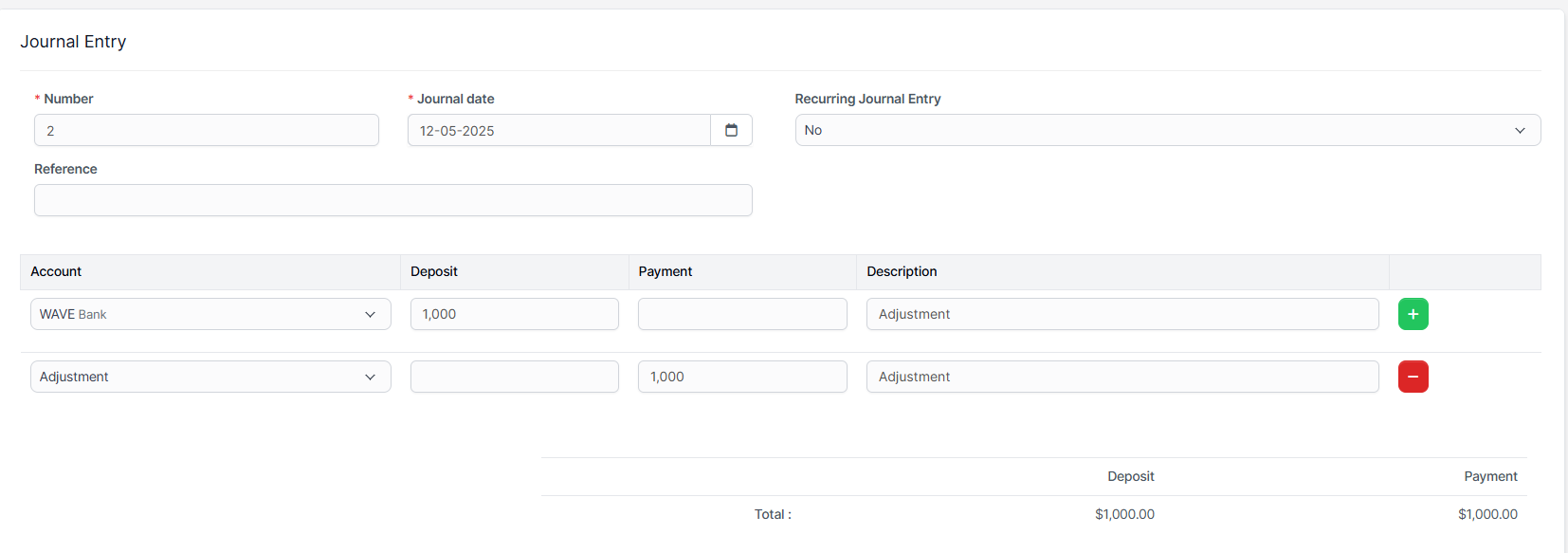
💡 Make sure the Deposit = Payment for the entry to be valid.
💾 Step 4: Save the Entry
-
Confirm all values are correctly entered
-
Click Save Journal Entry
-
Your bank account is now adjusted